
Simplify your Paint Business
From raw materials to finished products, ColourPost streamlines your production, inventory, and finances so you can focus on innovation and growth.

Empowering Paint Manufacturers
ColourPost is a SaaS platform designed for SME paint manufacturers. It streamlines production with tools for raw material tracking, batch creation, and inventory management, ensuring accurate cost calculations and resource optimization. ColourPost also simplifies sales with integrated order management, payment tracking, and revenue accounting. Expense tracking provides a clear view of profitability. Its intuitive interface helps boost productivity, reduce waste, and scale operations while maintaining business performance visibility.
Key Features
Issue raw materials and calculate costs with ease.
Monitor stock, pricing, and availability in real-time.
Track payments, match revenue to costs, and monitor expenses effortlessly.
How it Works
ColourPost simplifies your paint manufacturing operations by organizing raw materials, production, and sales in a seamless flow. Here's how to quickly get started to maximize the platform's potential:
- Go to the ColourPost login page.
- Enter your registered username and password.
- Click Sign In to access your dashboard.
- Navigate to "Inventory"
- Open the "Raw Materials" tab and click on "Add New Material" button.
- Fill in the required details (e.g Material Name, Quantity, and Unit Cost), and save the entry
- Repeat for all raw materials.
- Navigate to "Production" and click the "Product Categories" button, then click on "Create Category".
- Provide the Category Name and the Raw Materials required to produce it, then save the entry.
- Add additional categories as needed to organize your products.
From "Production", Navigate to "Packaging" tab, then click on "Add Packaging". Next, define packaging sizing and alias, and save the entry.
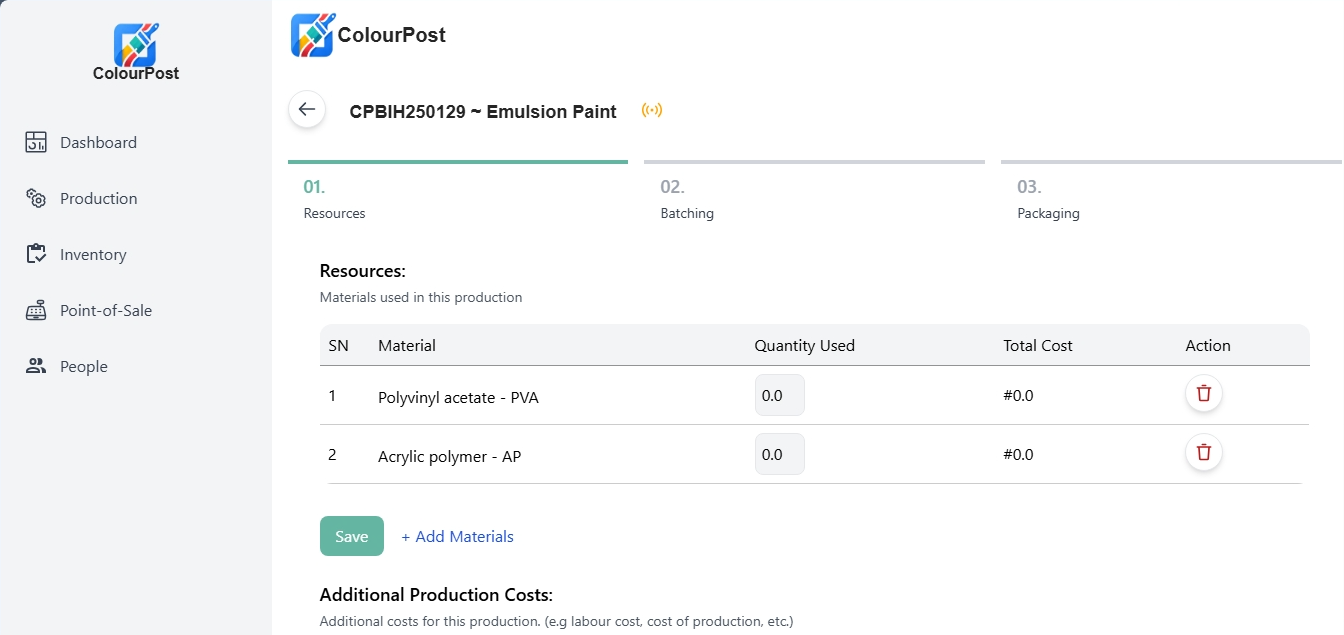
Creating a production batch in ColourPost is a straightforward process. First, navigate to the "Production" tab and click "Create New Batch." You'll then enter the batch details, including a name (e.g., Batch001), the product category (e.g., Silk Paint), and select the raw materials used, specifying the quantity of each. ColourPost automatically calculates the total batch cost based on these raw material inputs. After saving the batch, you can view the finished products by navigating to the "Inventory" tab and selecting the "Finished Product" section. Here, you can confirm the quantities produced, and these finished products will automatically be reflected in your inventory.
Testimonials
- Arun, Paint Manufacturer